 unlose
Unlose what your AI agent deleted.
Before your AI agent starts, unlose quietly snapshots your disks. After it deletes, corrupts, or encrypts your files — you drag a timeline and get them back. Native Windows. No WSL. No hooks to bypass.
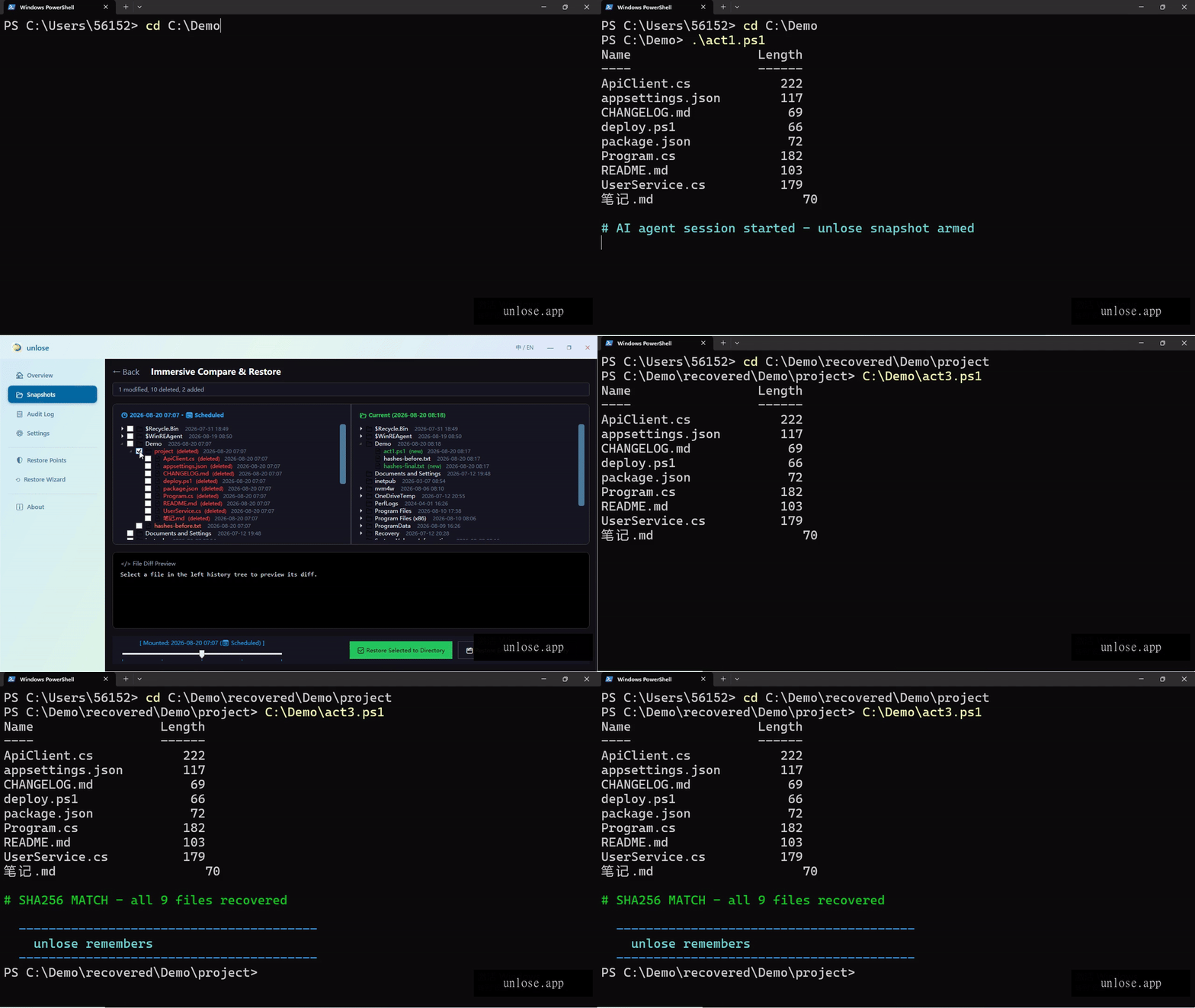
A safety net, not another watcher
A time machine, not a monitor
unlose never records your screen, audio, keystrokes, or file contents for inspection. It keeps filesystem snapshots — a copy of your data at a point in time. Only you ever open them.
Native Windows. No WSL, no hooks.
A Windows service with a WPF desktop UI, CLI, and MCP server. Installs with a single MSI. No Linux VM layer, no file-system filter drivers, no command interception to bypass.
VSS shadow copies agents cannot delete
Snapshots live in Windows VSS shadow storage — they are not ordinary files. File-level deletions (including by AI agents and ransomware) cannot reach them.
When it saves you
Developers burned by an AI agent
An AI wiped your project directory with one bad move. Open unlose, drag the timeline back to before it acted — every file comes back, byte-identical.
Heavy AI users
You run batch refactors, scripts, and data processing with Claude Code / Cursor / Copilot every day. unlose snapshots before every session — let the AI go wild.
The ransomware-wary
Ransomware encrypts files; it cannot reach VSS shadow copies. The snapshot from before the encryption is still there — restore to a new directory, zero ransom.
Interceptors stop the bullet. unlose is the time machine.
On 2026-07-10, an AI assistant wiped a prominent founder’s Mac — bypassing every command interceptor in four rounds. Interception is a cat-and-mouse game you cannot win.
| Command interceptors (e.g. DCG) | unlose | |
|---|---|---|
| Role | First line: block dangerous commands | Last line: snapshot safety net |
| Approach | Guess and block destructive paths | Don't guess. Just save. |
| Can it be bypassed? | Yes — proven in the wild | No — the snapshot exists before the deletion |
| Windows native? | Often requires WSL | Yes — pure Windows service |
💬 Interceptors stop the bullet. unlose is the time machine. Use both.
Other things you may have tried
File History, System Restore, data-recovery software — none of them were designed for "an AI deleted my files".
| unlose | File History | System Restore | Recovery software | |
|---|---|---|---|---|
| Recover files an AI deleted | ✅ | ⚠️ Must be configured first; often off | ❌ Does not restore personal files | ⚠️ Fails once data is overwritten |
| Automatic (AI-session aware) | ✅ | ❌ | ❌ | ❌ |
| Backups an agent cannot delete | ✅ VSS shadow copies | ❌ Ordinary files | ✅ | — |
| File-level diff, pick-and-choose restore | ✅ | ❌ | ❌ | ⚠️ |
| Free & open source | ✅ Apache-2.0 | ✅ Built-in | ✅ Built-in | ❌ |
Verified with tests, not marketing
Real-snapshot restore verified byte-for-byte on a real host, including full-volume restore and ransomware-simulation recovery; 147 unit tests and 16 UI automation tests pass.
Protection that happens before the AI acts
Snapshots before AI sessions
Detects 30+ mainstream AI agents launching (Claude Code, Cursor, Copilot, Gemini CLI, Kimi, Qwen, Codex…) and snapshots before they act. Scheduled snapshots too — three fixed times daily (08:00/13:00/18:00) by default, switchable to 6/12/24/48h intervals.
The AI reads the safety memo itself
unlose injects a protection directive into your ~/AGENTS.md and installed agents’ global memory: "snapshot before sessions, snapshot before dangerous operations, recover with unlose". The AI reads it. Zero config.
Immersive restore, like turning a clock
Dual-pane timeline, four-color diff (deleted / modified / added), line-level diff with +X/-Y stats, lazy-loaded file trees. Pick files out of the box, or enable full-volume in-place restore in Settings.
Pick-and-choose recovery, zero risk
Restore selected files or directories to a new folder of your choice — current files are never overwritten. Full-volume in-place restore is off by default; enable it in Settings (non-system volumes only) and type a confirmation phrase to proceed.
Real status, real event log
Four true states: Protecting / Paused / Suspended (low disk) / Offline. Every row in the event log is real. No fake "all safe" dashboard.
CLI + MCP + skill file
unlose.exe with strict exit codes for scripting, an MCP server so AI tools can snapshot directly, and a shipped skill file that teaches agents to snapshot before acting.
Questions you might ask
Is unlose another surveillance tool like Rewind or Recall?
No. unlose never records your screen, audio, keystrokes, or file contents for inspection. It only keeps filesystem snapshots — copies of your data at points in time. You are the only one who ever opens them. It is a time machine, not a monitor.
Does unlose block commands?
No, and it never will. Blocking destructive commands is a losing cat-and-mouse game — that is what interceptors like DCG are for. unlose is the last line of defense: the snapshot exists before the deletion, so nothing needs to be guessed or blocked.
Will it work with my AI tool?
If it runs on Windows, very likely. unlose detects 30+ mainstream agents out of the box (Claude Code, Cursor, Copilot, Gemini CLI, Kimi, Qwen, Codex, DeepSeek and more) — newly installed tools work with zero configuration. CLI, MCP, and skill-file integration are included.
What about macOS / Linux?
Windows-first by design — unlose is built on Windows VSS, which has no Linux equivalent. macOS is on the roadmap after Windows product-market validation; Linux is not planned.
Does it support Windows 7?
No. unlose is built on .NET 8 and modern VSS APIs — Windows 10 x64 is the minimum. Windows 7 reached end of support in 2020 and is not recommended for running AI agents anyway.
How much does it cost?
Free, open source (Apache-2.0). No telemetry, no account, no cloud. Future plans: optional offsite backup and an enterprise edition for centralized management — open-source features stay free.
How do I verify a build is official?
Official builds come only from the official repository or this website (unlose.app). The current release is unsigned — always verify the SHA256 checksum against the value published on each Release page (PowerShell: Get-FileHash); for fully reproducible checks, build from source — the full test suite runs locally. A signed build will follow in a later Release.
Claude Code deleted my files — how do I get them back?
Open the unlose UI, drag the timeline to the snapshot from before it acted, check the lost files or directories, and restore them to a new directory of your choice — nothing current is ever overwritten. Agents cannot delete VSS shadow copies, so the snapshot is usually still there.
How is unlose different from File History or System Restore?
File History must be configured in advance (most people never turn it on) and its backups are ordinary files an agent can delete too; System Restore does not recover personal files; recovery software fails once data is overwritten. unlose is built for "an AI deleted my files": snapshots before every session, stored in VSS shadow copies, with file-level diff and pick-and-choose restore.
Your AI agent will make mistakes. Be ready when it does.
Free · Apache-2.0 · Windows 10/11 x64 · No telemetry